Firmware API
This resource manages the location of the firmware files for both OKMs and IR4 keys.
The purpose of the Firmware API is to create, read, update, delete the URLs that the OKM uses to download its firmware files.
Currently, the Firmware API supports CRUD operations for the following types of firmware:
- OKM Firmware
- Batch Key Firmware
- LoRa Key Firmware
The files can be hosted anywhere. At this time, all files are hosted on Google Cloud, in a series of buckets, one for each firmware and environment:
ir4-kas-firmware-<env>for OKM firmware;ir4-key-batch-<env>for IR4 batch key firmware;ir4-lora-firmware-<env>for IR4 LoRa key firmware.
For example, the dev OKM firmware is in the ir4-kas-firmware-dev bucket. Production firmware buckets don’t have the -<env> suffix, so the production OKM firmware is in ir4-kas-firmware.
Although there are firmware buckets for dev, qa, etc. most OKM service instances will connect to the production firmware bucket, to make sure that the software is tested against what the users will use in production. The other buckets are used in specific controlled scenarios to test upcoming OKM features.
Context
When an OKM calls the OKM service, the service checks if the OKM has the most recent version. If the OKM needs a more recent firmware, the service replies with a URL indicating where to download the firmware.
The diagram below shows the flow for the OKM firmware. The flow for IR4 Key firmware is the same: the configController checks the batchKeyFirmware and wirelessKeyFirmware values for the batch and LoRa key firmware versions respectively.
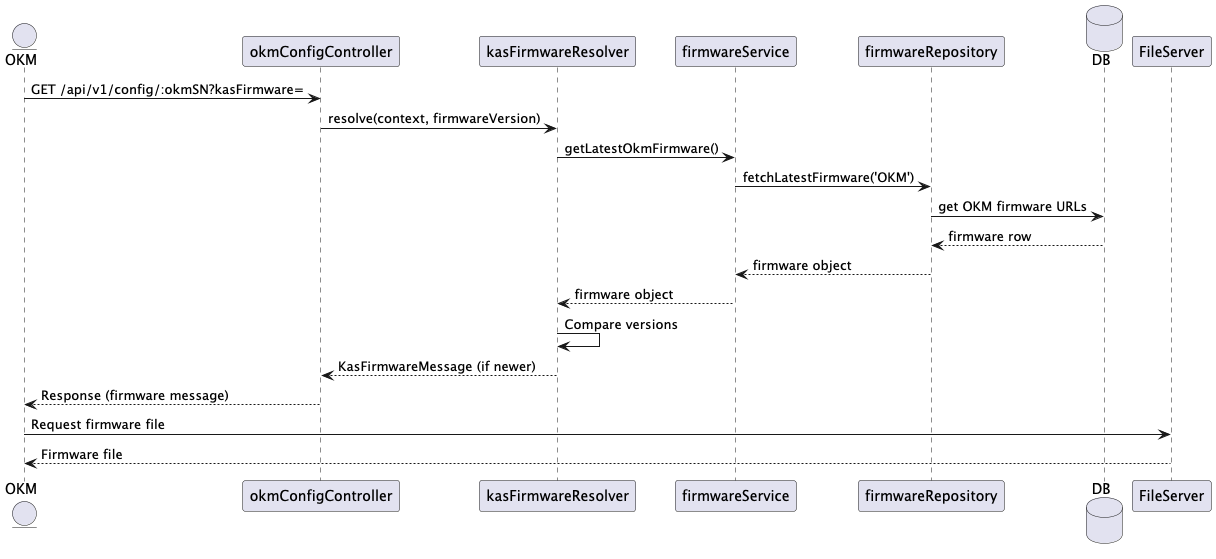
Fig. 1 OKM Firmware Resolution Sequence Diagram
Because the OKM firmware version impacts all OKM operations, it is the first thing that is checked. The key firmware versions, however, are the last things verified when a config request is parsed. See OKM Config API.
At this time the OKM service returns the URL to the file on Google Cloud. Eventually, the file data will be returned from the database instead.
When a new version of a firmware is added to the bucket, someone needs to add the corresponding entry through this API.
GET
Get a Firmware Entry by its id.
Example request:
GET api/v1/firmware/:id
HTTP/1.1 200 OK
Content-Type: application/json; charset=utf-8
{
    "msg": "Firmwares fetched successfully",
    "data":
    {
        "id": "421d73aa-af8f-467f-a8e8-ee1331378ea8",
        "type": "OKM",
        "version": "01932023020111482",
        "url": "https://storage.googleapis.com/<BUCKET_NAME>/<FIRMWARE_FILE_NAME>.bin&alt=media"
    }
}
When the firmware entry is not found in the system:
HTTP/1.1 404 Not Found
Content-Type: application/json; charset=utf-8
{
  "errors": [
    {
      "status": 404,
      "detail": "Firmware not found"
    }
  ]
}
Possible errors:
| Error code | Description |
|---|---|
| 401 Unauthorized | The accessToken is invalid or has been revoked. |
| 404 Not Found | The firmware entry was not found. |
Context requirement (access right)
The following context must be present in the JWT access token “context” object:
"context": {
  "service-okm": {
    "firmware": ["read"]
  }
}
POST
Sending a POST to the okm endpoint will create a firmware entry.
At this time, there are two types of firmware entries : OKM and IR4KEY .
Example request:
POST api/v1/firmware
{
"type": "OKM",
"version": "01932023020111482",
"url": "https://storage.googleapis.com/<BUCKET_NAME>/<FIRMWARE_FILE_NAME>.bin&alt=media"
}
The response for success:
HTTP/1.1 201 OK
Content-Type: application/json; charset=utf-8
 {
    "status": true,
    "msg": "Firmware created successfully",
    "data": {
        "id": "421d73aa-af8f-467f-a8e8-ee1331378ea8",
        "type": "OKM",
        "version": "01932023020111482",
        "url": "https://storage.googleapis.com/<BUCKET_NAME>/<FIRMWARE_FILE_NAME>.bin&alt=media"
    }
}
If a firmware entry for the same version already exists:
HTTP/1.1 400 Bad Request
Content-Type: application/json; charset=utf-8
{
    "errors": [
        {
          "status": 400,
          "detail": "duplicate key value violates unique constraint \"firmware_type_version_key\""
        }
    ]
}
Possible errors:
| Error code | Description |
|---|---|
| 400 Bad Request | Validation failed for the request. |
| 401 Unauthorized | The accessToken is invalid or has been revoked. |
Context requirement (access right)
The following context must be present in the JWT access token “context” object:
"context": {
  "service-okm": {
    "firmware": ["create"]
  }
}
PUT
Sending a PUT to the Firmware config endpoint will update a firmware entry .
PUT api/v1/firmware/firmwareId
Example request:
{
  {
    "id": "421d73aa-af8f-467f-a8e8-ee1331378ea8",
    "type": "OKM",
    "version": "01932023020111482",
    "url": "https://storage.googleapis.com/<BUCKET_NAME>/<FIRMWARE_FILE_NAME>.bin&alt=media"
  }
}
The response for success:
HTTP/1.1 200 OK
Content-Type: application/json; charset=utf-8
{
  "status": true,
  "msg": "Firmware updated successfully",
  "data": {
    "id": "421d73aa-af8f-467f-a8e8-ee1331378ea8",
    "type": "OKM",
    "version": "01932023020111482",
    "url": "https://storage.googleapis.com/<BUCKET_NAME>/<FIRMWARE_FILE_NAME>.bin&alt=media"
  }
}
If firmware config does not exist.
HTTP/1.1 400 Bad Request
Content-Type: application/json; charset=utf-8
{
  "errors": [
    {
      "status": 400,
      "detail": "Failed to update firmware"
    }
  ]
}
Possible errors:
| Error code | Description |
|---|---|
| 400 Bad Request | Bad Request. Validation failed for the request. |
| 401 Unauthorized | The accessToken is invalid or has been revoked. |
Context requirement (access right)
The following context must be present in the JWT access token “context” object:
"context": {
  "service-okm": {
    "firmware": ["update"]
  }
}
DELETE
Delete a firmware entry by its id.
Example request:
DELETE api/v1/firmware/:id
Returns a 204 with an empty body.
If the firmware entry is not found:
HTTP/1.1 404 Not Found
Content-Type: application/json; charset=utf-8
{
  "errors": [
    {
      "status": 404,
      "detail": "Firmware to delete not found"
    }
  ]
}
Possible errors:
| Error code | Description |
|---|---|
| 401 Unauthorized | The accessToken is invalid or has been revoked. |
| 404 Not Found | The firmware entry is not found. |
Context requirement (access right)
The following context must be present in the JWT access token “context” object:
"context": {
  "service-okm": {
    "firmware": ["delete"]
  }
}
PATCH
Not supported, the request will return
| Error code | Description |
|---|---|
| 405 Method Not Allowed | Cannot PATCH |